Share This Post

Friday, 18 September 2015

amazing php code

amazing php code:

10 awesome PHP functions and snippets

Every web developer should keep useful code snippets in a personal library for future reference. Today, I’m showing you the 10 most useful snippets and functions I have added to my snippet library from the past 3 months.

Sanitize database inputs

When inserting data in your database, you have to be really careful about SQL injections and other attempts to insert malicious data into the db. The function below is probably the most complete and efficient way to sanitize a string before using it with your database.
function cleanInput($input) {

  $search = array(
    '@<script[^>]*?>.*?</script>@si',   // Strip out javascript
    '@<[\/\!]*?[^<>]*?>@si',            // Strip out HTML tags
    '@<style[^>]*?>.*?</style>@siU',    // Strip style tags properly
    '@<![\s\S]*?--[ \t\n\r]*>@'         // Strip multi-line comments
  );

    $output = preg_replace($search, '', $input);
    return $output;
  }
?>
<?php
function sanitize($input) {
    if (is_array($input)) {
        foreach($input as $var=>$val) {
            $output[$var] = sanitize($val);
        }
    }
    else {
        if (get_magic_quotes_gpc()) {
            $input = stripslashes($input);
        }
        $input  = cleanInput($input);
        $output = mysql_real_escape_string($input);
    }
    return $output;
}
Here’s some examples of use:
<?php
  $bad_string = "Hi! <script src='http://www.evilsite.com/bad_script.js'></script> It's a good day!";
  $good_string = sanitize($bad_string);
  // $good_string returns "Hi! It\'s a good day!"

  // Also use for getting POST/GET variables
  $_POST = sanitize($_POST);
  $_GET  = sanitize($_GET);
?>
Source: http://css-tricks.com/snippets/php/sanitize-database-inputs/

Calculate distance between two points

Want to be able to calculate the distance between two points? The function below use the latitude and longitude of two locations, and calculate the distance between them in both miles and metric units.
function getDistanceBetweenPointsNew($latitude1, $longitude1, $latitude2, $longitude2) {
    $theta = $longitude1 - $longitude2;
    $miles = (sin(deg2rad($latitude1)) * sin(deg2rad($latitude2))) + (cos(deg2rad($latitude1)) * cos(deg2rad($latitude2)) * cos(deg2rad($theta)));
    $miles = acos($miles);
    $miles = rad2deg($miles);
    $miles = $miles * 60 * 1.1515;
    $feet = $miles * 5280;
    $yards = $feet / 3;
    $kilometers = $miles * 1.609344;
    $meters = $kilometers * 1000;
    return compact('miles','feet','yards','kilometers','meters'); 
}
Example:
$point1 = array('lat' => 40.770623, 'long' => -73.964367);
$point2 = array('lat' => 40.758224, 'long' => -73.917404);
$distance = getDistanceBetweenPointsNew($point1['lat'], $point1['long'], $point2['lat'], $point2['long']);
foreach ($distance as $unit => $value) {
    echo $unit.': '.number_format($value,4).'<br />';
}
Source: http://www.inkplant.com/code/calculate-the-distance-between-two-points.php

Get all tweets of a specific hashtag

Here’s a quick and easy way to get all tweets of a specific usage using the useful cURL library. The following example will retrieve all tweets with the #cat hashtag.
function getTweets($hash_tag) {

    $url = 'http://search.twitter.com/search.atom?q='.urlencode($hash_tag) ;
    echo "<p>Connecting to <strong>$url</strong> ...</p>";
    $ch = curl_init($url);
    curl_setopt ($ch, CURLOPT_RETURNTRANSFER, TRUE);
    $xml = curl_exec ($ch);
    curl_close ($ch);

    //If you want to see the response from Twitter, uncomment this next part out:
    //echo "<p>Response:</p>";
    //echo "<pre>".htmlspecialchars($xml)."</pre>";

    $affected = 0;
    $twelement = new SimpleXMLElement($xml);
    foreach ($twelement->entry as $entry) {
        $text = trim($entry->title);
        $author = trim($entry->author->name);
        $time = strtotime($entry->published);
        $id = $entry->id;
        echo "<p>Tweet from ".$author.": <strong>".$text."</strong>  <em>Posted ".date('n/j/y g:i a',$time)."</em></p>";
    }

    return true ;
}

getTweets('#cats');
Source: http://www.inkplant.com/code/get-twitter-posts-by-hashtag.php

Applying Even/Odd Classes

When generating lists or tables using php, it is super useful to apply even/odd classes to each row of data in order to simplify CSS styling.
Used inside a loop, class names would be named .example-class0 and .example-class1 alternating. Increasing the “2” number allows you to increment in thirds or fourths or whatever you need:
<div class="example-class<?php echo ($xyz++%2); ?>">
Source: http://css-tricks.com/snippets/php/applying-evenodd-classes/

Email error logs to yourself

Instead of publicly displaying possible errors on your website, why not using a custom error handler to email error logs to yourself? Here’s a handy code snippet to do it.
<?php

// Our custom error handler
function nettuts_error_handler($number, $message, $file, $line, $vars){
 $email = "
  <p>An error ($number) occurred on line 
  <strong>$line</strong> and in the <strong>file: $file.</strong> 
  <p> $message </p>";
  
 $email .= "<pre>" . print_r($vars, 1) . "</pre>";
 
 $headers = 'Content-type: text/html; charset=iso-8859-1' . "\r\n";
 
 // Email the error to someone...
 error_log($email, 1, 'you@youremail.com', $headers);

 // Make sure that you decide how to respond to errors (on the user's side)
 // Either echo an error message, or kill the entire project. Up to you...
 // The code below ensures that we only "die" if the error was more than
 // just a NOTICE. 
 if ( ($number !== E_NOTICE) && ($number < 2048) ) {
  die("There was an error. Please try again later.");
 }
}

// We should use our custom function to handle errors.
set_error_handler('nettuts_error_handler');

// Trigger an error... (var doesn't exist)
echo $somevarthatdoesnotexist;

Source: http://net.tutsplus.com/tutorials/php/quick-tip-email-error-logs-to-yourself-with-php/

Automatically creates variables with the same name as the key in the POST array

This snippet is very helpful for every POST processing. All you need is an array with expected keys in the POST array. This snippet automatically creates variables with the same name as the key in the POST array. If the key is not found in the POST array the variable is set to NULL. Basically you dont need to write:
$username=$_POST["username"];
$age=$_POST["age"];
etc.
This snippet will do this boring part of every PHP code with POST handling so you can fully focus on a validation of the input, because that is much more important.
<?php
$expected=array('username','age','city','street');
foreach($expected as $key){
    if(!empty($_POST[$key])){
        ${key}=$_POST[$key];
    }
    else{
        ${key}=NULL;
    }
}
?>
Source: http://www.catswhocode.com/blog/snippets/automatically-creates-variables…

Download & save a remote image on your server using PHP

Here’s a super easy and efficient way to download a remote image and save it on your own server.
$image = file_get_contents('http://www.url.com/image.jpg');
file_put_contents('/images/image.jpg', $image); //save the image on your server
Source: http://www.catswhocode.com/blog/snippets/download-save-a-remote-image…

Create data uri’s

Data uri’s can be useful for embedding images into HTML/CSS/JS to save on HTTP requests, at the cost of maintainability. You can use online tools to create data uri’s, or you can use the simple PHP function below:
function data_uri($file, $mime) {
  $contents=file_get_contents($file);
  $base64=base64_encode($contents);
  echo "data:$mime;base64,$base64";
}
Source: http://css-tricks.com/snippets/php/create-data-uris/

Detect browser language

When developing a multilingual website, I really like to retrieve the browser language and use this language as the default language for my website. Here’s how I get the language used by the client browser:
function get_client_language($availableLanguages, $default='en'){
 if (isset($_SERVER['HTTP_ACCEPT_LANGUAGE'])) {
  $langs=explode(',',$_SERVER['HTTP_ACCEPT_LANGUAGE']);

  foreach ($langs as $value){
   $choice=substr($value,0,2);
   if(in_array($choice, $availableLanguages)){
    return $choice;
   }
  }
 } 
 return $default;
}
Source: http://snipplr.com/view/12631/detect-browser-language/php-detect-browser-language

Add (th, st, nd, rd, th) to the end of a number

This simple and easy function will take a number and add “th, st, nd, rd, th” after it. Very useful!
function ordinal($cdnl){ 
    $test_c = abs($cdnl) % 10; 
    $ext = ((abs($cdnl) %100 < 21 && abs($cdnl) %100 > 4) ? 'th' 
            : (($test_c < 4) ? ($test_c < 3) ? ($test_c < 2) ? ($test_c < 1) 
            ? 'th' : 'st' : 'nd' : 'rd' : 'th')); 
    return $cdnl.$ext; 
}  
for($i=1;$i<100;$i++){ 
    echo ordinal($i).'<br>'; 
} 
Source: http://phpsnips.com/snip-37

Monday, 24 August 2015

How nodejs event loop works

How nodejs event loop works


One of the best advantage of Node.js over other Server side technologies is executing asynchronous code. But how Node.js executes it ? You may have heard of Event loop which helps JavaScript to execute asynchronous code and this post is all about understanding how event loop works.

Consider following code.
console.log("i am first");
console.log("i am second");
console.log("i am third");
If you execute this code you will get the output in following manner.
i am first
i am second
i am third
But how does it work internally ? If you are from CS background you may have heard of Stack which Compilers uses to handle function call.
So if there is any function call, it push into stack and Machine takes the code from stack and execute it. So in case of above code, it will be like this.
Screenshot from 2015-08-07 10:30:07
But this code is Synchronous i.e it runs in series. But how come asynchronous works, that’s quite a more fun. Let’s have a look.
Consider following code.
experiment.js
console.log("i am first");

setTimeout(function timeout() {
    console.log("i am second");
}, 5000);

console.log("i am third");
Copy this code and paste it into file name experiment.js and run using
node experiment.js
You will get following output.
Screenshot from 2015-08-07 10:34:41
Did you notice a difference ? Its “first”,”third” and then “second” ! Why is that cause “setTimeout” is asynchronous function and Node.js will not block the program to wait for it.
it will continue to execute and at the end it will the second console. But again , How it works ?
Here comes the concept of “event loop”. To handle the asynchronous nature of program, Node.js uses external “Queue” where it inserts the callback of asynchronous code rather than pushing it into stack.
There is no official name of this queue, somewhere i heard “message queue” and some say “callback queue” or may be something else. You can pick any !
Since that piece of code is not in stack, node runtime will not execute it immediately. Depending on the nature of asynchronous code (I/O, Network call, DNS etc ), Node.js will spawn the “libuv” thread and execute it and as soon as thread processing is done and result is ready to process by node runtime,event loop checks “is the stack empty ?” If stack is empty and Queue has some data, event loop will take the top most one from it and push it inside of stack for processing.
Task of event loop is to check is there any item present in Queue and if Stack empty then push it on stack else wait for next tick ( Yes process.nextTick ).
Here i tried to show it via image ( i am not good at it ).
Screenshot from 2015-08-07 11:01:38
To prove above,consider following code.
experiment.js
console.log("i am first");

setTimeout(function timeout() {
    console.log("i am second");
}, 0);

console.log("i am third");
Let’s see output of it.
Screenshot from 2015-08-07 10:34:41
Even though i have set Timeout to be 0 second, it will still give you output same as above and that is because of Callback queue. setTimeout will execute immediately but since Stack is not empty it won’t push it in stack and node runtime will not process it.

Build a RESTful API using Node and MongoDB

3
SHARE
Learn Web Design, Coding & More. No Risk. No Contracts. Learn More
MongoDB is open source, NoSQL, document oriented database designed for scaling and performance. MongoDB can be easily interface with Node.js cause Mongo provides official native driver. In this tutorial we are going to learn following things.
DOWNLOAD

Seting up MongoDB

Visit official MongoDB download page to download MongoDB installer for specific operating system. They will detect your OS and offer you stable version to download. Once you have download it, just follow the setup wizard instructions to install it in your system.
To begin using the MongoDB, you need to specify the location where MongoDB will store your databases. That location will be a normal folder. Create any folder say “mongoData” at location easily accessible to you say on Desktop and open up terminal.
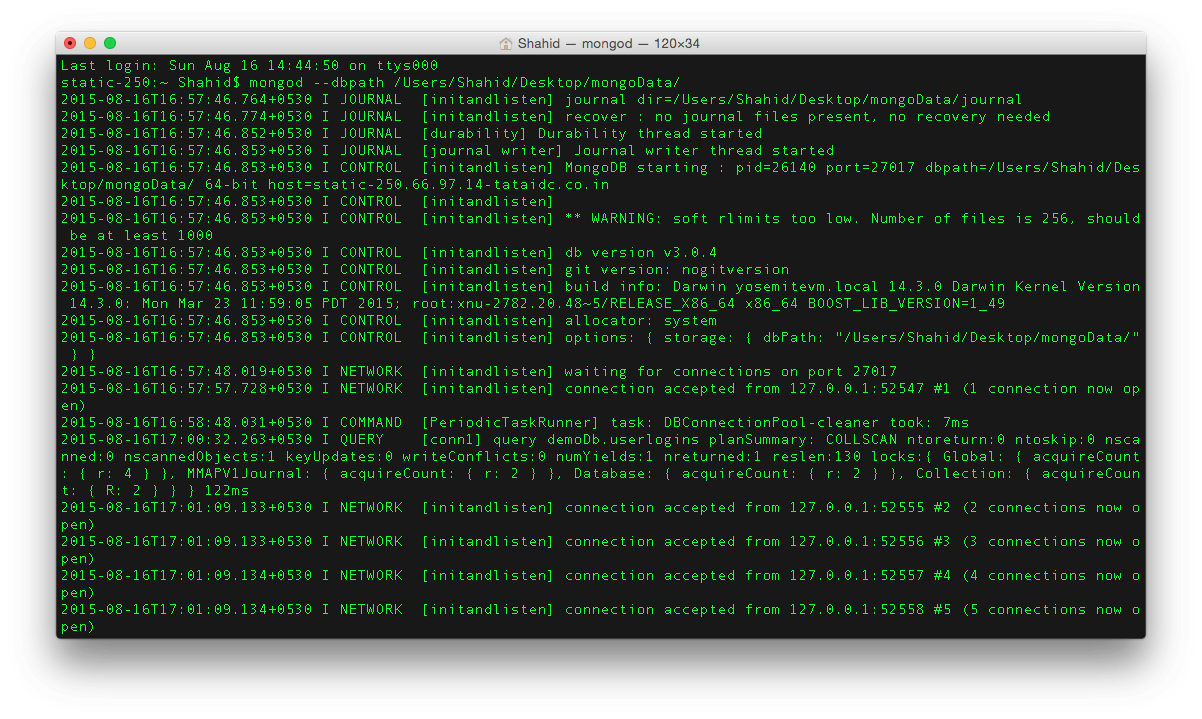
Open up terminal and run following command to start MongoDB Server at default port.
mongod --dbpath /Users/Shahid/Desktop/mongoData //for mac
mongod --dbpath c:/Users/Shahid/Desktop/mongoData //for windows
mongod --dbpath /home/Shahid/Desktop/mongoData //for Linux
You should see following screen after running above command.
MongoDB Server
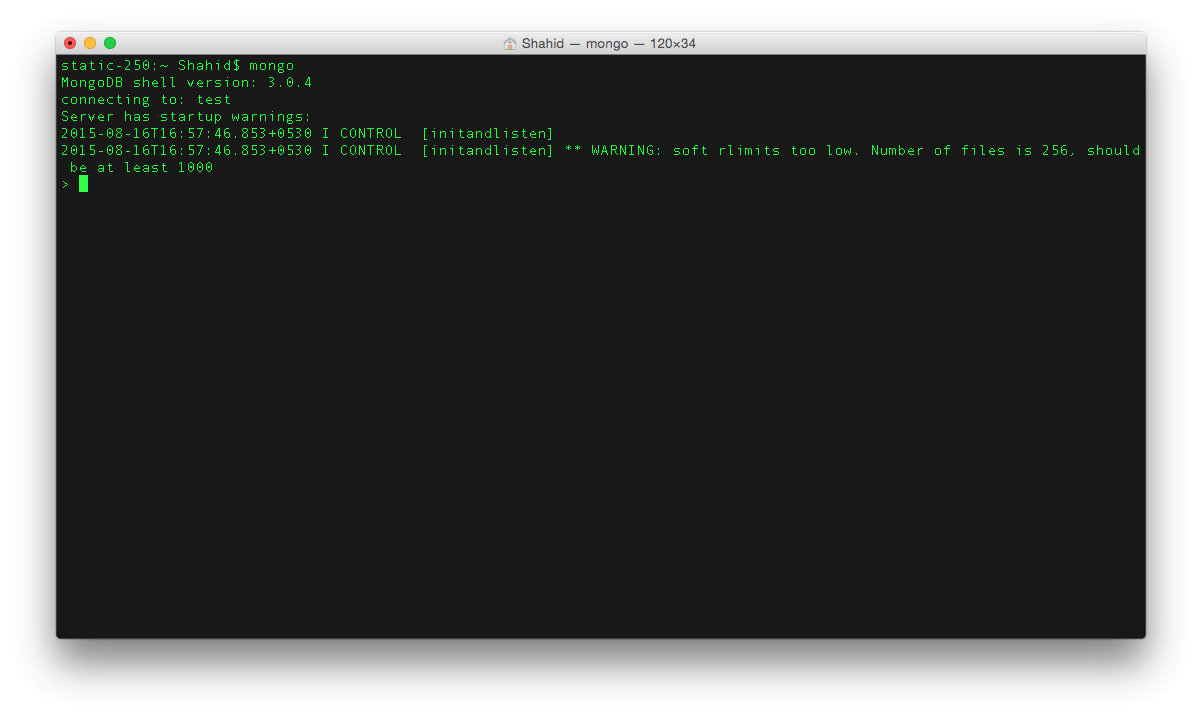
Now open up another terminal and run following command.
mongo
You should see following screen.
Mongo
To create new database, run following command.
use database_name
Inside database, you create collections which actually like a table in database that will store your information. We will do all that using code. Let’s move to next step !

Installing NPM modules.

MongoDB provide native driver for Node.js called “mongodb” which you can use to connect to MongoDB and perform various CRUD operation. There is another MongoDB recommended node module which is quite famous called “mongoose” and this one we are going to use.
Create project folder and start your project by using “npm init” cause its good practice. This wizard will ask you some question like name, version, test script etc and at the end you will have your package.json file ready.
To install mongoose run following command.
npm install --save mongoose
Here is my package.json.
package.json
{
  "name": "nodeMongo",
  "version": "1.0.0",
  "description": "Node.js and MongoDb tutorial.",
  "main": "Server.js",
  "scripts": {
    "test": "mocha"
  },
  "repository": {
    "type": "git",
    "url": "https://github.com/codeforgeek/Node-and-mongo-tutorial"
  },
  "keywords": [
    "Node.js",
    "mongoDb"
  ],
  "author": "Shahid Shaikh",
  "license": "ISC",
  "bugs": {
    "url": "https://github.com/codeforgeek/Node-and-mongo-tutorial/issues"
  },
  "homepage": "https://github.com/codeforgeek/Node-and-mongo-tutorial",
  "dependencies": {
    "body-parser": "^1.13.3",
    "express": "^4.13.3",
    "mongoose": "^4.1.2"
  }
}
You can copy this and create your package file and run following command to install the modules.
npm install
This is it, we have bootstrapped our project. Let’s write some code.

Setting up our Server.

To set up our project Server, we are going to use Express module. Here is our basic server.
Server.js
var express     =   require("express");
var app         =   express();
var bodyParser  =   require("body-parser");
var router      =   express.Router();

app.use(bodyParser.json());
app.use(bodyParser.urlencoded({"extended" : false}));

router.get("/",function(req,res){
    res.json({"error" : false,"message" : "Hello World"});
});

app.use('/',router);

app.listen(3000);
console.log("Listening to PORT 3000");
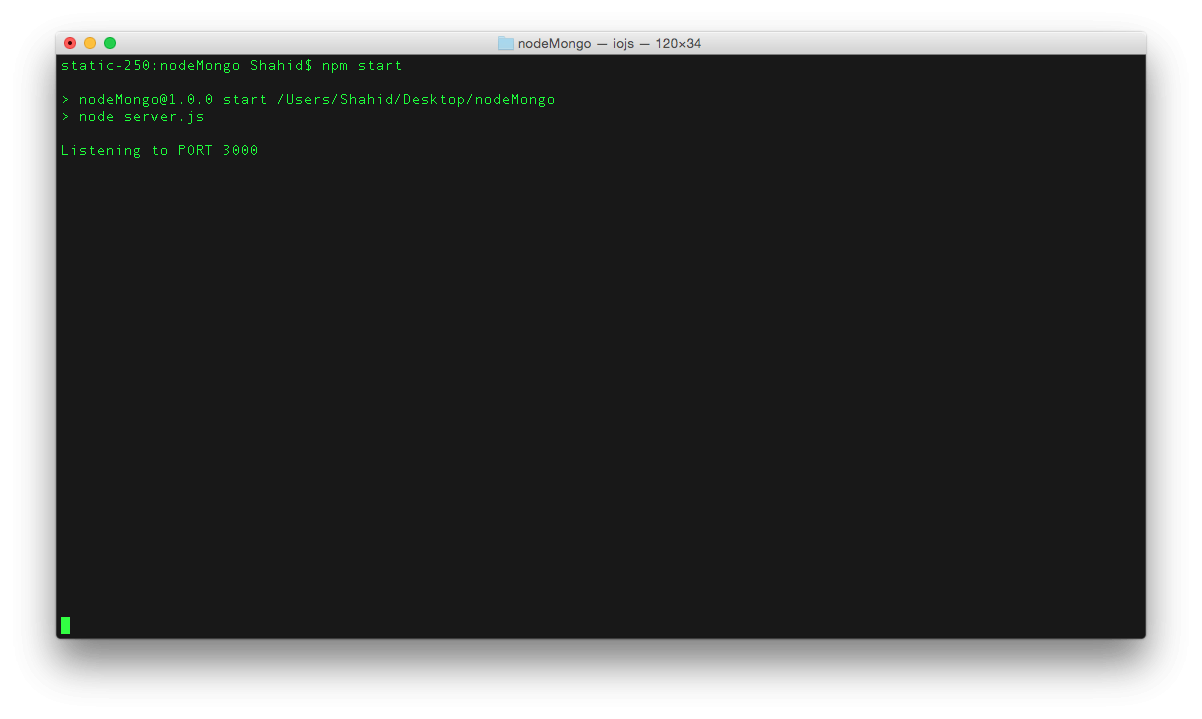
Let’s run our code and see how it’s behaving. Run the code using following command.
npm start
Node.js server
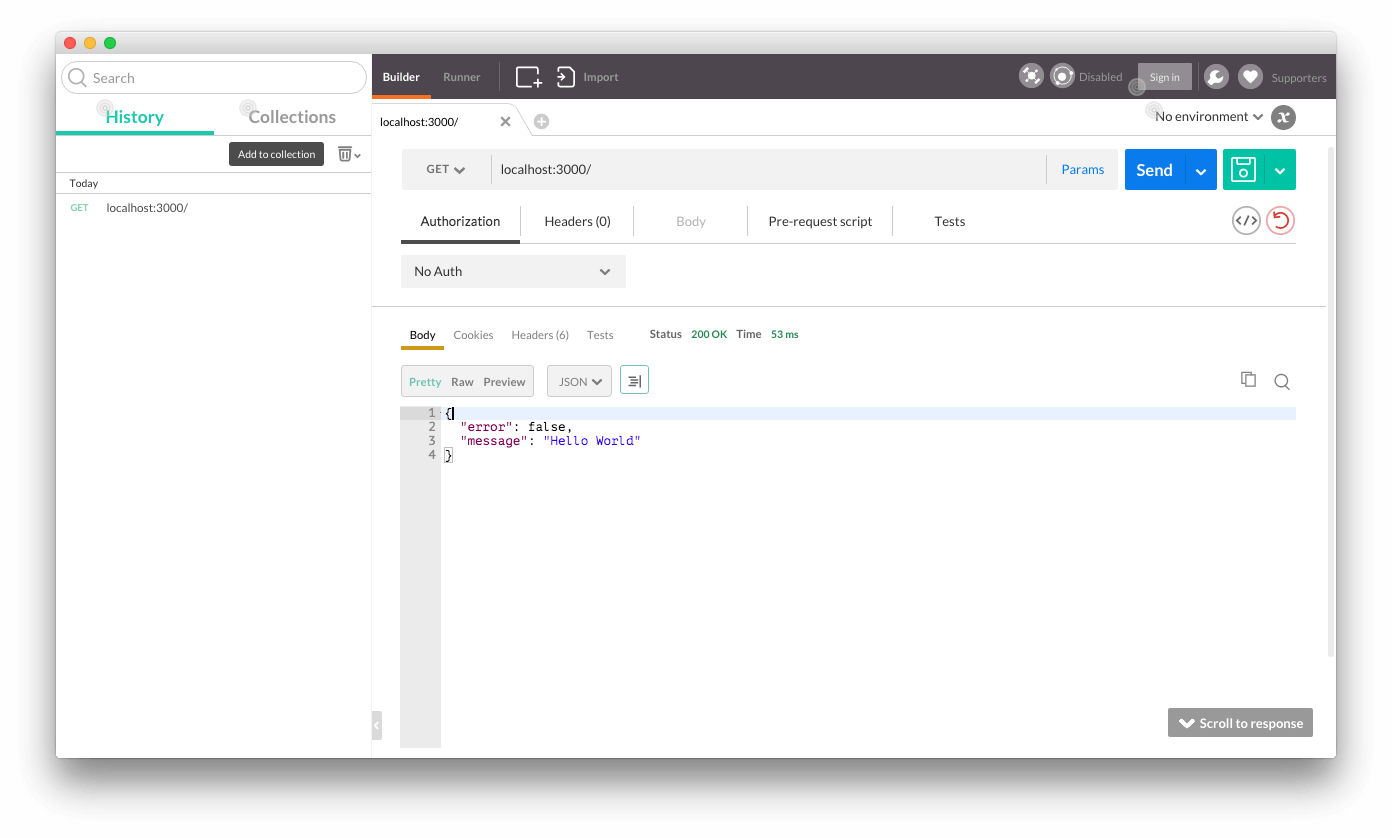
Let’s test our first route using PostMan ( REST simulator chrome extension ).
Hello world
All right. We have set up our Server successfully. Moving right along !

Creating basic MongoDB model.

Mongoose allows you to create models ( OR Schema OR tables ) in your MongoDB database. To connect mongoDB database to our Node.js here is two-line of code.
var mongoose    =   require("mongoose");
mongoose.connect('mongodb://localhost:27017/demoDb');
/*
   * MongoDB port is 27017 by default.
   * Assuming you have created mongoDB database named "demoDb".
*/
Unlike SQL queries, MongoDB uses JSON structure to create schema in model. So for example if you want to create simple table user_login with two column say email and password you need to write following code
var mongoSchema =   mongoose.Schema;
var userSchema  = {
    "userEmail" : String,
    "userPassword" : String
};
mongoose.model('user_login',userSchema);
Create separate folder called “model” and inside create file named“mongo.js” and add following line of code.
/model/mongo.js
var mongoose    =   require("mongoose");
mongoose.connect('mongodb://localhost:27017/demoDb');
// create instance of Schema
var mongoSchema =   mongoose.Schema;
// create schema
var userSchema  = {
    "userEmail" : String,
    "userPassword" : String
};
// create model if not exists.
module.exports = mongoose.model('userLogin',userSchema);
In Server.js add following line.
var mongoOp     =   require("./models/mongo");

Creating RESTful API’s using Node and MongoDB.

We have covered complete tutorial on RESTful API’s using MySQL. Let’s develop simple RESTful engine using MongoDB.
So our Resource will be “users” and on that we are going to allow following CRUD operation.
  • GET /users – Return all Users from MongoDB
  • POST /users – Add new user in MongoDB
  • GET /users/:id – Return User with matched ID
  • PUT /users/:id – Update users information
  • DELETE /users/:id – Delete particular user

1 : GET /users – Return all Users from MongoDB.

Here is our code.
Server.js
var express     =   require("express");
var app         =   express();
var bodyParser  =   require("body-parser");
var mongoOp     =   require("./models/mongo");
var router      =   express.Router();

app.use(bodyParser.json());
app.use(bodyParser.urlencoded({"extended" : false}));

router.get("/",function(req,res){
    res.json({"error" : false,"message" : "Hello World"});
});

//route() will allow you to use same path for different HTTP operation.
//So if you have same URL but with different HTTP OP such as POST,GET etc
//Then use route() to remove redundant code.

router.route("/users")
    .get(function(req,res){
        var response = {};
        mongoOp.find({},function(err,data){
        // Mongo command to fetch all data from collection.
            if(err) {
                response = {"error" : true,"message" : "Error fetching data"};
            } else {
                response = {"error" : false,"message" : data};
            }
            res.json(response);
        });
    });

app.use('/',router);

app.listen(3000);
console.log("Listening to PORT 3000");
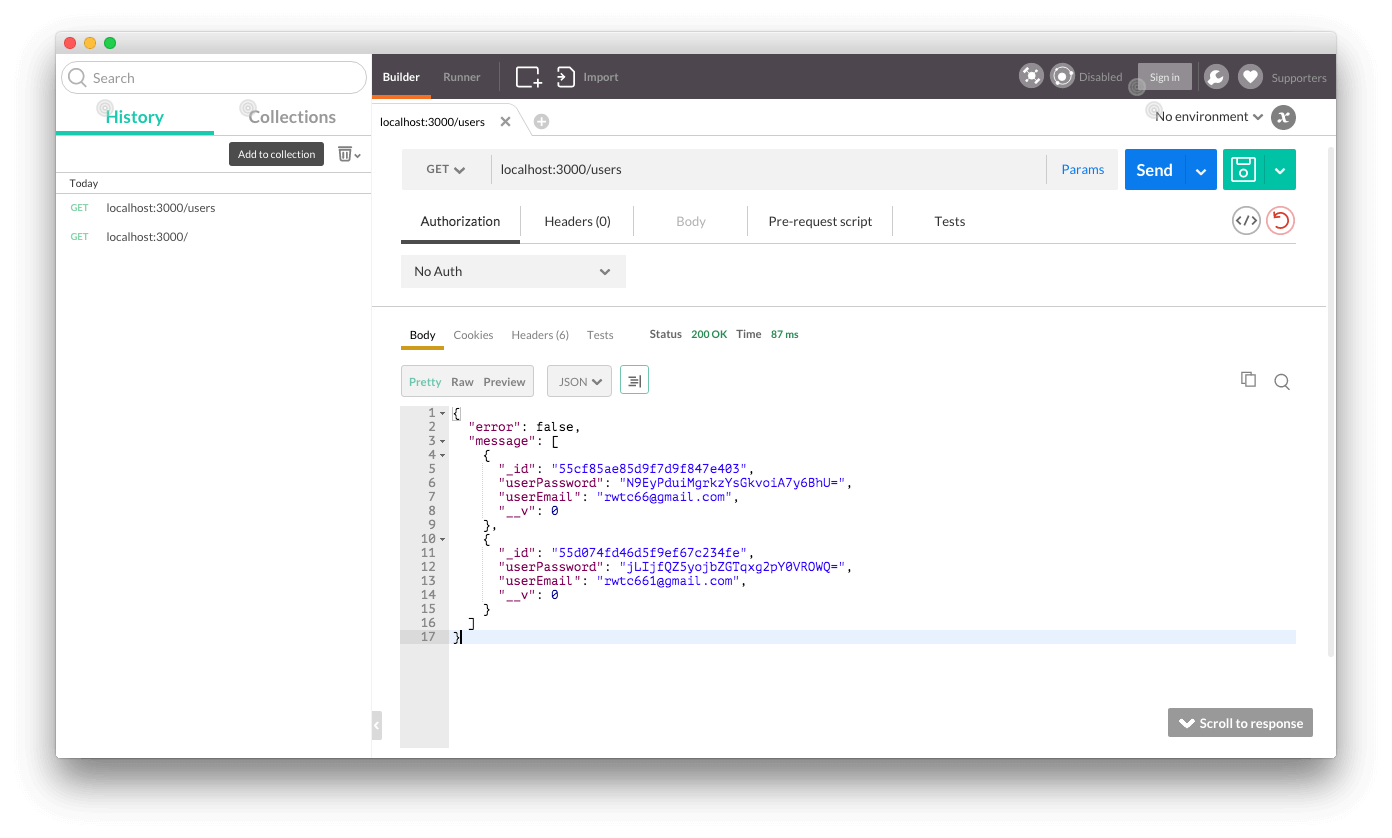
To test the API, open up POSTMAN and hit “localhost:3000/users”. You should see following screen. ( I added some users while testing )
Get all users

2 : POST /users – Add new user in MongoDB.

Here is a code.
Server.js
var express     =   require("express");
var app         =   express();
var bodyParser  =   require("body-parser");
var mongoOp     =   require("./models/mongo");
var router      =   express.Router();

app.use(bodyParser.json());
app.use(bodyParser.urlencoded({"extended" : false}));

router.get("/",function(req,res){
    res.json({"error" : false,"message" : "Hello World"});
});

//route() will allow you to use same path for different HTTP operation.
//So if you have same URL but with different HTTP OP such as POST,GET etc
//Then use route() to remove redundant code.

router.route("/users")
    .get(function(req,res){
        ------------------------------------------------------
    })
    .post(function(req,res){
        var db = new mongoOp();
        var response = {};
        // fetch email and password from REST request.
        // Add strict validation when you use this in Production.
        db.userEmail = req.body.email;
        // Hash the password using SHA1 algorithm.
        db.userPassword =  require('crypto')
                          .createHash('sha1')
                          .update(req.body.password)
                          .digest('base64');
        db.save(function(err){
        // save() will run insert() command of MongoDB.
        // it will add new data in collection.
            if(err) {
                response = {"error" : true,"message" : "Error adding data"};
            } else {
                response = {"error" : false,"message" : "Data added"};
            }
            res.json(response);
        });
    });

app.use('/',router);

app.listen(3000);
console.log("Listening to PORT 3000");
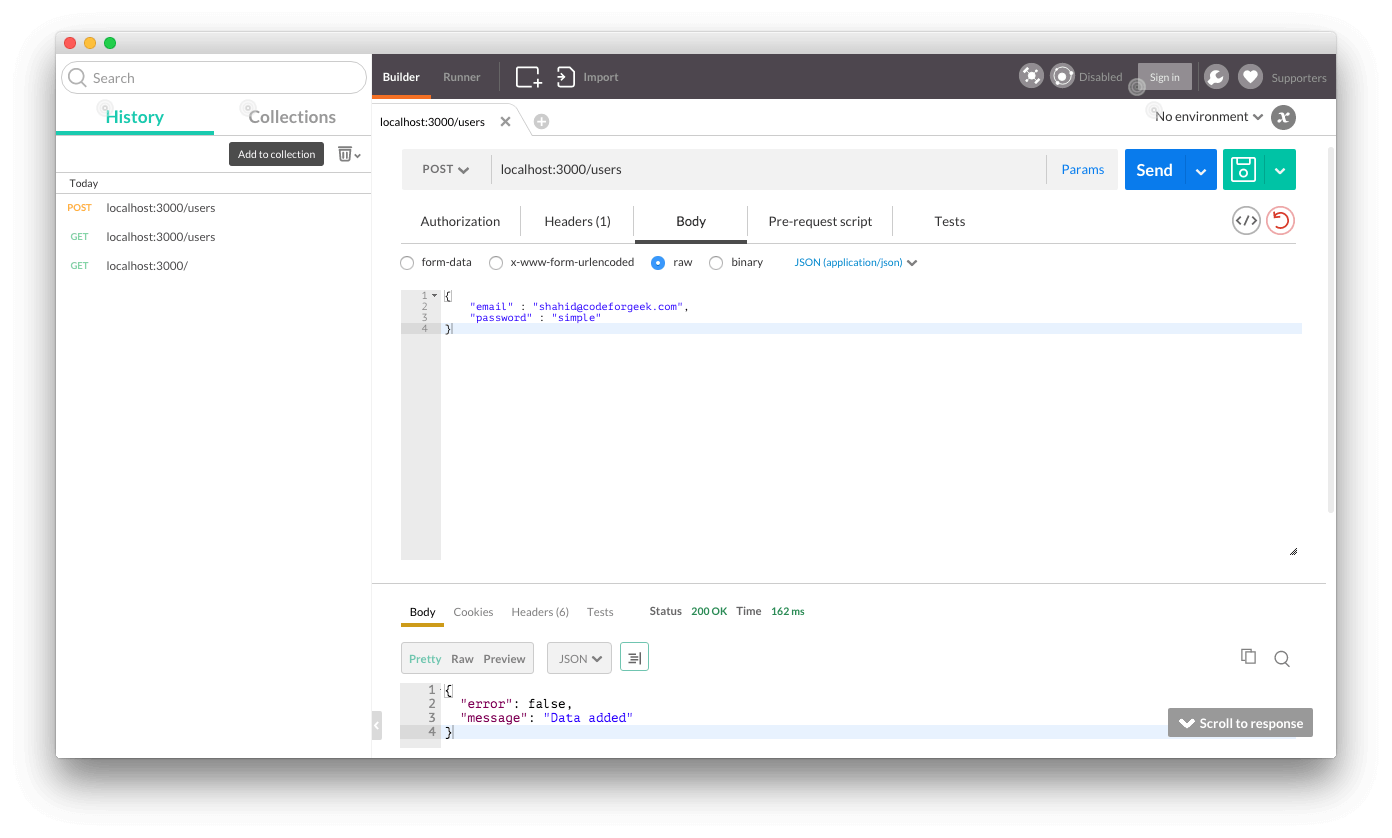
To add new user in MongoDB, open up POSTMAN, use POST as type and add following in input payload.
{
    "email" : "shahid@codeforgeek.com",
    "password" : "simple"
}
Add new user

3: GET /users/:id – Return User with matched ID.

Here is our code.
Server.js
var express     =   require("express");
var app         =   express();
var bodyParser  =   require("body-parser");
var mongoOp     =   require("./models/mongo");
var router      =   express.Router();

app.use(bodyParser.json());
app.use(bodyParser.urlencoded({"extended" : false}));

router.get("/",function(req,res){
    res.json({"error" : false,"message" : "Hello World"});
});

//route() will allow you to use same path for different HTTP operation.
//So if you have same URL but with different HTTP OP such as POST,GET etc
//Then use route() to remove redundant code.

router.route("/users")
    .get(function(req,res){
        ------------------------------
    })
    .post(function(req,res){
        ------------------------------
    });

router.route("/users/:id")
    .get(function(req,res){
        var response = {};
        mongoOp.findById(req.params.id,function(err,data){
        // This will run Mongo Query to fetch data based on ID.
            if(err) {
                response = {"error" : true,"message" : "Error fetching data"};
            } else {
                response = {"error" : false,"message" : data};
            }
            res.json(response);
        });
    })

app.use('/',router);

app.listen(3000);
console.log("Listening to PORT 3000");
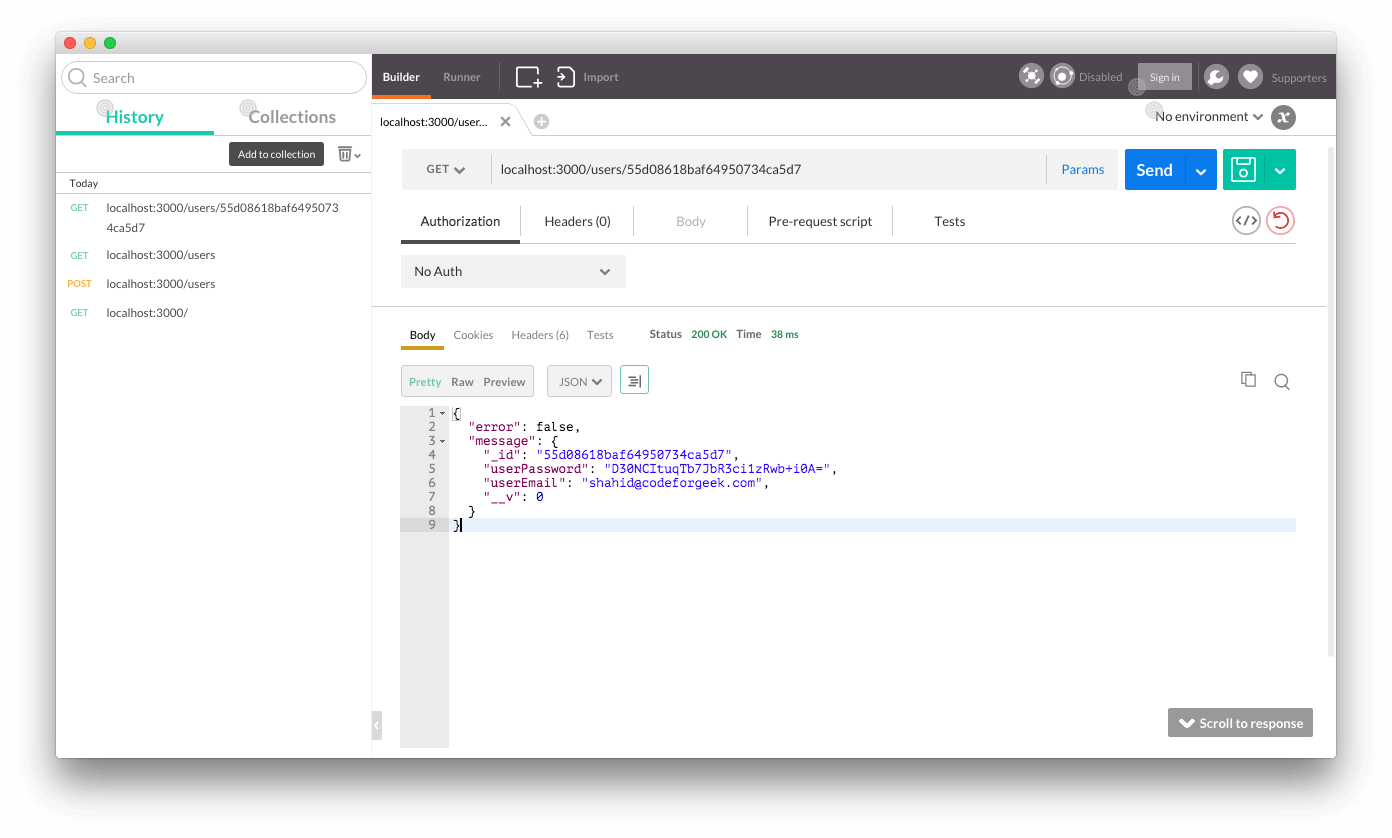
To check this route, hit our first API to get all users and copy any one ID. Then just paste the ID right after the URL and hit the request.
Get single user

4 : PUT /users/:id – Update users information.

Here is our code.
Server.js
var express     =   require("express");
var app         =   express();
var bodyParser  =   require("body-parser");
var mongoOp     =   require("./models/mongo");
var router      =   express.Router();

app.use(bodyParser.json());
app.use(bodyParser.urlencoded({"extended" : false}));

router.get("/",function(req,res){
    res.json({"error" : false,"message" : "Hello World"});
});

//route() will allow you to use same path for different HTTP operation.
//So if you have same URL but with different HTTP OP such as POST,GET etc
//Then use route() to remove redundant code.

router.route("/users")
    .get(function(req,res){
        -------------------------------
    })
    .post(function(req,res){
        -------------------------------
    });

router.route("/users/:id")
    .get(function(req,res){
        -------------------------------
    })
    .put(function(req,res){
        var response = {};
        // first find out record exists or not
        // if it does then update the record
        mongoOp.findById(req.params.id,function(err,data){
            if(err) {
                response = {"error" : true,"message" : "Error fetching data"};
            } else {
            // we got data from Mongo.
            // change it accordingly.
                if(req.body.userEmail !== undefined) {
                    // case where email needs to be updated.
                    data.userEmail = req.body.userEmail;
                }
                if(req.body.userPassword !== undefined) {
                    // case where password needs to be updated
                    data.userPassword = req.body.userPassword;
                }
                // save the data
                data.save(function(err){
                    if(err) {
                        response = {"error" : true,"message" : "Error updating data"};
                    } else {
                        response = {"error" : false,"message" : "Data is updated for "+req.params.id};
                    }
                    res.json(response);
                })
            }
        });
    })

app.use('/',router);

app.listen(3000);
console.log("Listening to PORT 3000");
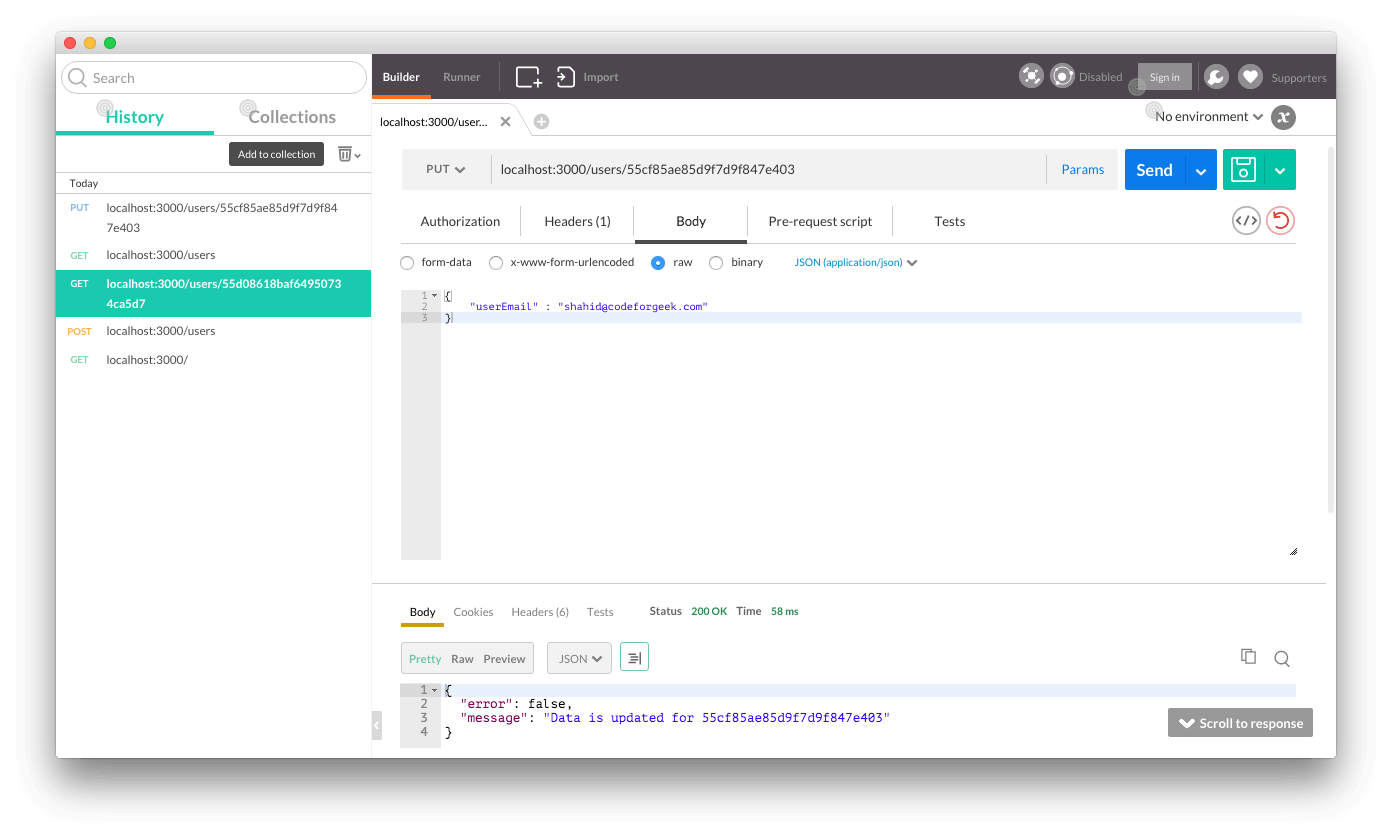
In order to execute it, first get the ID of any user and the select type of request as PUT and pass data which you want to update in JSON format.
Update user data
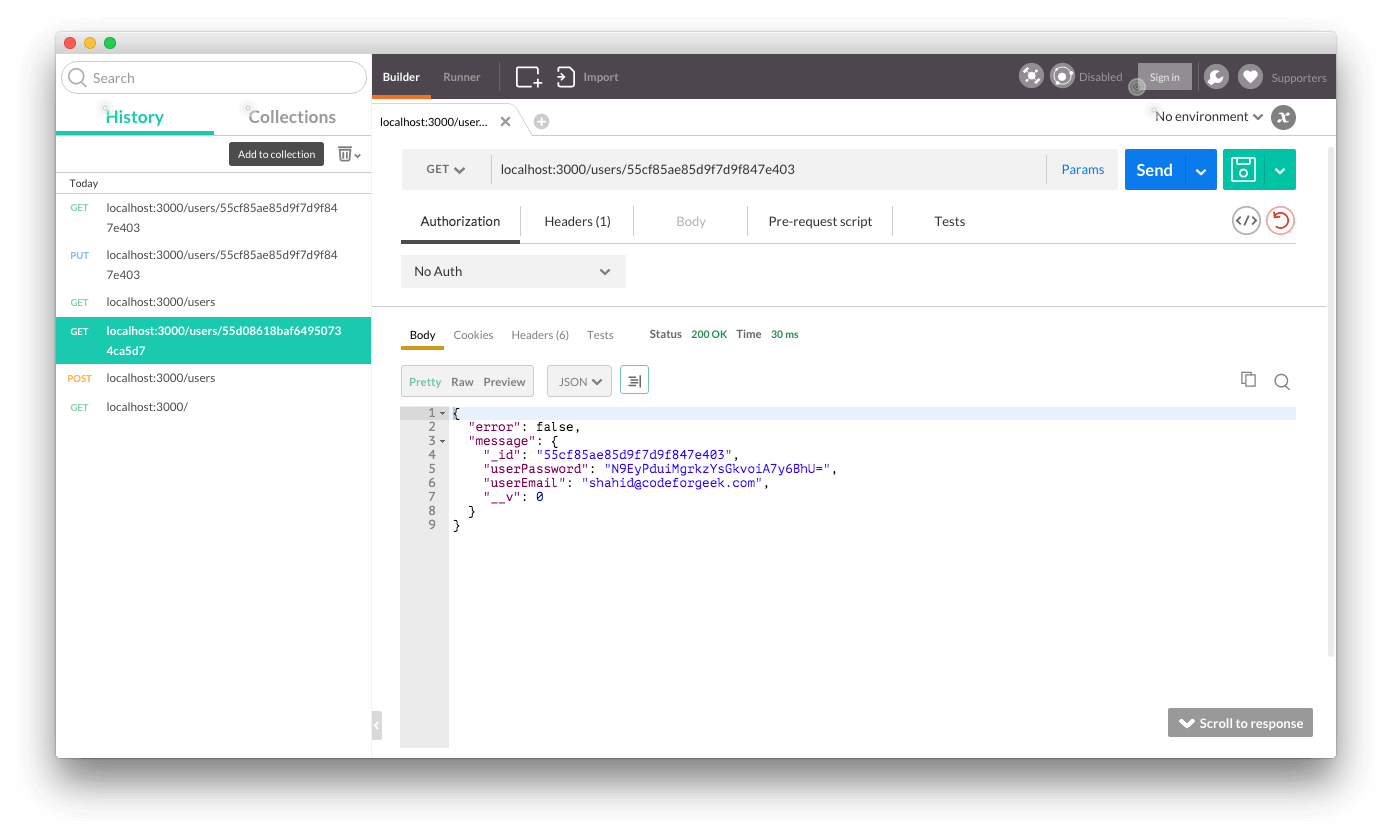
You can select that user detail to cross verify it. Just change the type to GET.
Get user data

5 : DELETE /users/:id – Delete particular user.

Here is our code.
Server.js
var express     =   require("express");
var app         =   express();
var bodyParser  =   require("body-parser");
var mongoOp     =   require("./models/mongo");
var router      =   express.Router();

app.use(bodyParser.json());
app.use(bodyParser.urlencoded({"extended" : false}));

router.get("/",function(req,res){
    res.json({"error" : false,"message" : "Hello World"});
});

router.route("/users")
    .get(function(req,res){
        ----------------------------------------
    })
    .post(function(req,res){
        ----------------------------------------
    });

router.route("/users/:id")
    .get(function(req,res){
        ----------------------------------------
    })
    .put(function(req,res){
        ----------------------------------------
    })
    .delete(function(req,res){
        var response = {};
        // find the data
        mongoOp.findById(req.params.id,function(err,data){
            if(err) {
                response = {"error" : true,"message" : "Error fetching data"};
            } else {
                // data exists, remove it.
                mongoOp.remove({_id : req.params.id},function(err){
                    if(err) {
                        response = {"error" : true,"message" : "Error deleting data"};
                    } else {
                        response = {"error" : true,"message" : "Data associated with "+req.params.id+"is deleted"};
                    }
                    res.json(response);
                });
            }
        });
    })

app.use('/',router);

app.listen(3000);
console.log("Listening to PORT 3000");
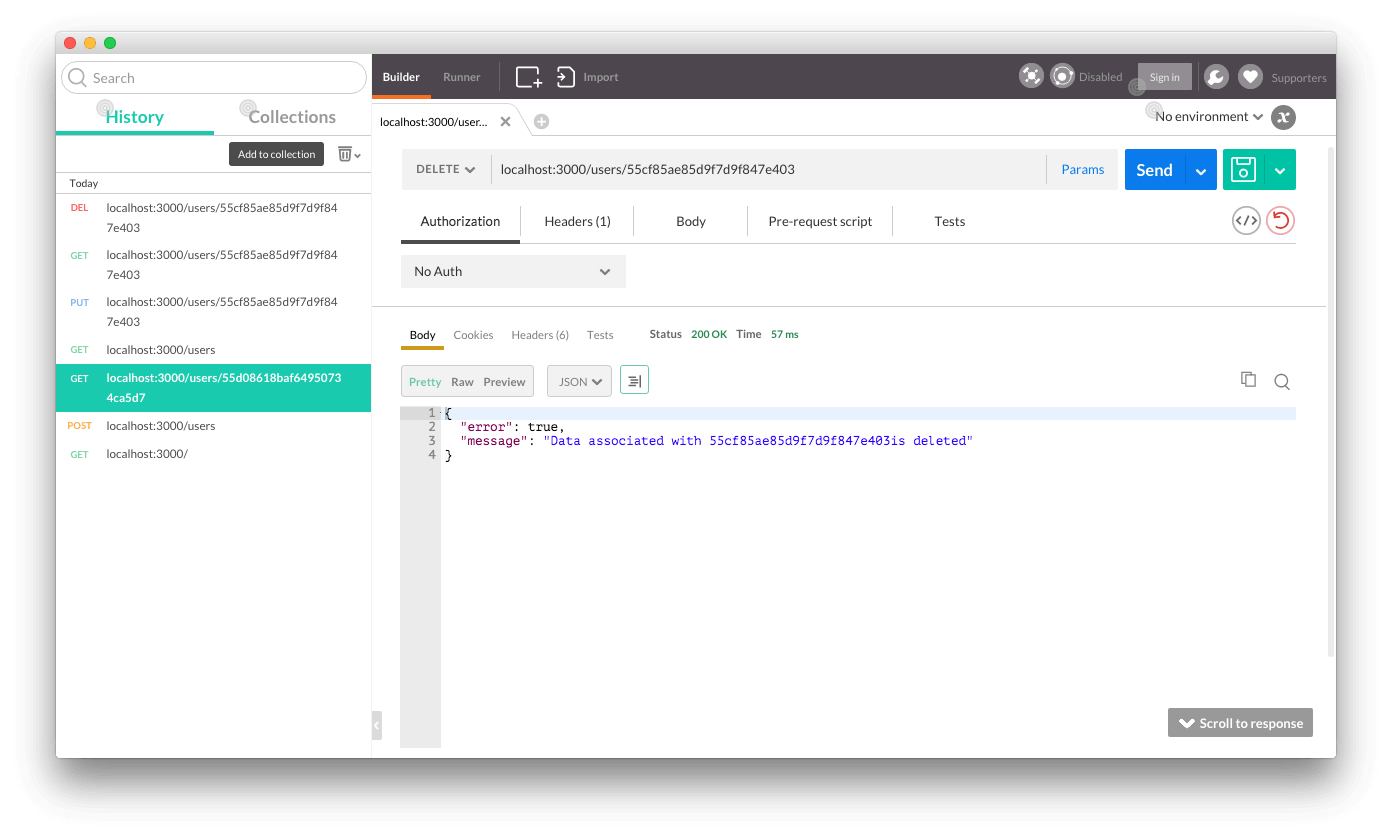
Just select the request type as DELETE and pass the ID which user you want to delete.
DELETE the user

Conclusion:

We have covered the information which you need to begin with MongoDB and Node.js along with RESTful api development tutorial. MongoDB is great in performing READ operation, so if you have a large amount of data say 1000TB then SQL is quite slow at that time. You can use big data software like MongoDB to handle that kind of record set.
Mongoose is wrapper over native Node.js driver provided by MongoDB. MongoDB official site recommends this module too.